Understanding Agent and Skill in One Diagram
One diagram and a few concrete analogies to clarify the core concepts behind AI Agents and Skills.
What is an Agent?
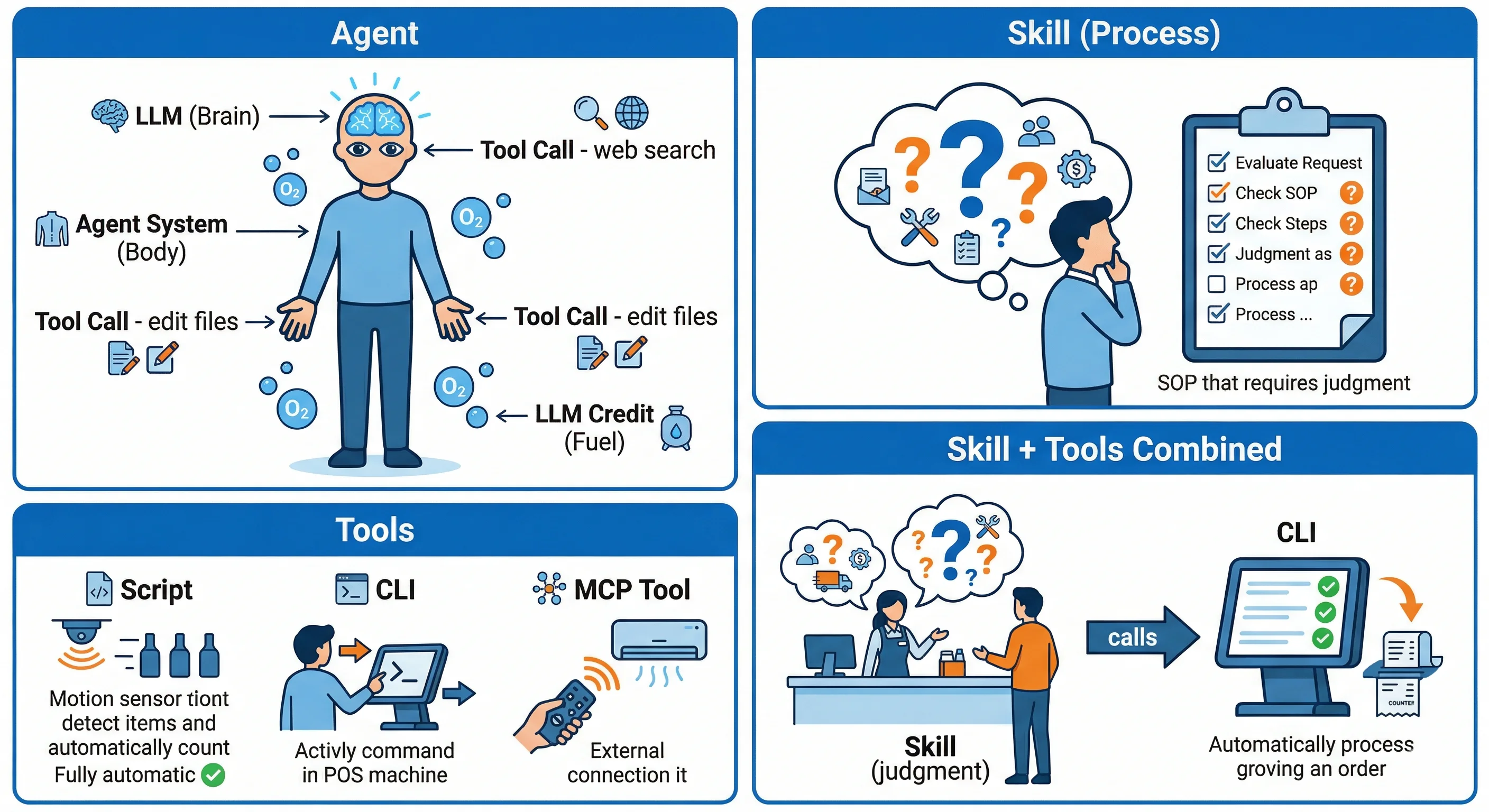
- LLM = the brain
- Agent System = the body
- LLM Credit = oxygen
- No payment, LLM stops = no oxygen, brain dies
- Tool Call = hands, feet, and senses
- Eyes that see (gather information, e.g. web search)
- Hands that write (produce output, e.g. edit files)
What is a Skill?
An abstracted SOP.
For example:
- Making a drink
- Grab a cup (restock if there are none left)
- Pour the tea (match the tea to the drink order)
- Add sugar (how much?)
- Add ice (how much?)
- Seal the cup
- Hand it to the customer
- Taking a shot on goal
- Eyes (Tool Call) locate the goal frame and the goalkeeper’s position
- Pass that information to the brain and think through the best way to shoot (call LLM)
- The body (Agent System) uses nerves to control the foot (Tool Call) to take the shot
What are Scripts, CLIs, and MCP Tools?
SOPs with clear enough steps aren’t a good fit for a Skill (markdown) — they’re better packaged directly as a script. More complex flows get packaged into a CLI or MCP Tool.
| Level | Definition | Human-era equivalent | Packaged as today |
|---|---|---|---|
| Script | Fully automatic, no input needed | Factory worker tallying on abacus | Counting sensor, auto-accumulates |
| CLI | Takes a command, processes it, returns a fixed result | Cashier manually ringing up items | POS machine (enter items → auto-calculate and print receipt) |
| MCP Tool | Connects to external services, standardized communication | Calling a courier company | Integrating a delivery API |
With both a process (Skill) and the right tools (Script, CLI, MCP Tool), handling any SOP becomes far more efficient. For example:
- Taking a customer’s order (Skill)
- Ask what they’d like and confirm the order
- Operate the POS machine — enter the order and calculate the total (CLI)
- Collect payment and give change
- Operate the POS machine — check out, print the receipt and invoice (CLI)
- Hand the invoice to the customer
What are MCP and MCP Tools?
Think of a remote control (MCP) and an air conditioner (MCP Tool).
- Remote control = MCP
- The standardized interface an Agent uses to communicate with external services
- The remote doesn’t cool the room — it just sends commands
- Air conditioner = MCP Tool
- The external service that actually does the work
- It only acts once it receives a command
The upside: one remote control standard can operate the AC, the TV, and the sound system. One MCP standard lets an Agent connect to a delivery API, a weather API, Slack, and more — without learning a new communication protocol for every service.
Summary
Humans actually work the same way — things we do repeatedly long enough become instinct, habit (Script). What’s left — the things that need actual thought and judgment — is when we engage the brain (Skill).
Agents just take that same idea and move it into software.

Logan
Senior software engineer, passionate about coding and smart home 🏠